Prompt library44 promptsCamera4 min read

Lens effects and visual FX

Prompt library · from the ReelMe composer

44 looks with previews: copy a style prompt, add your subject, run it in ReelMe.

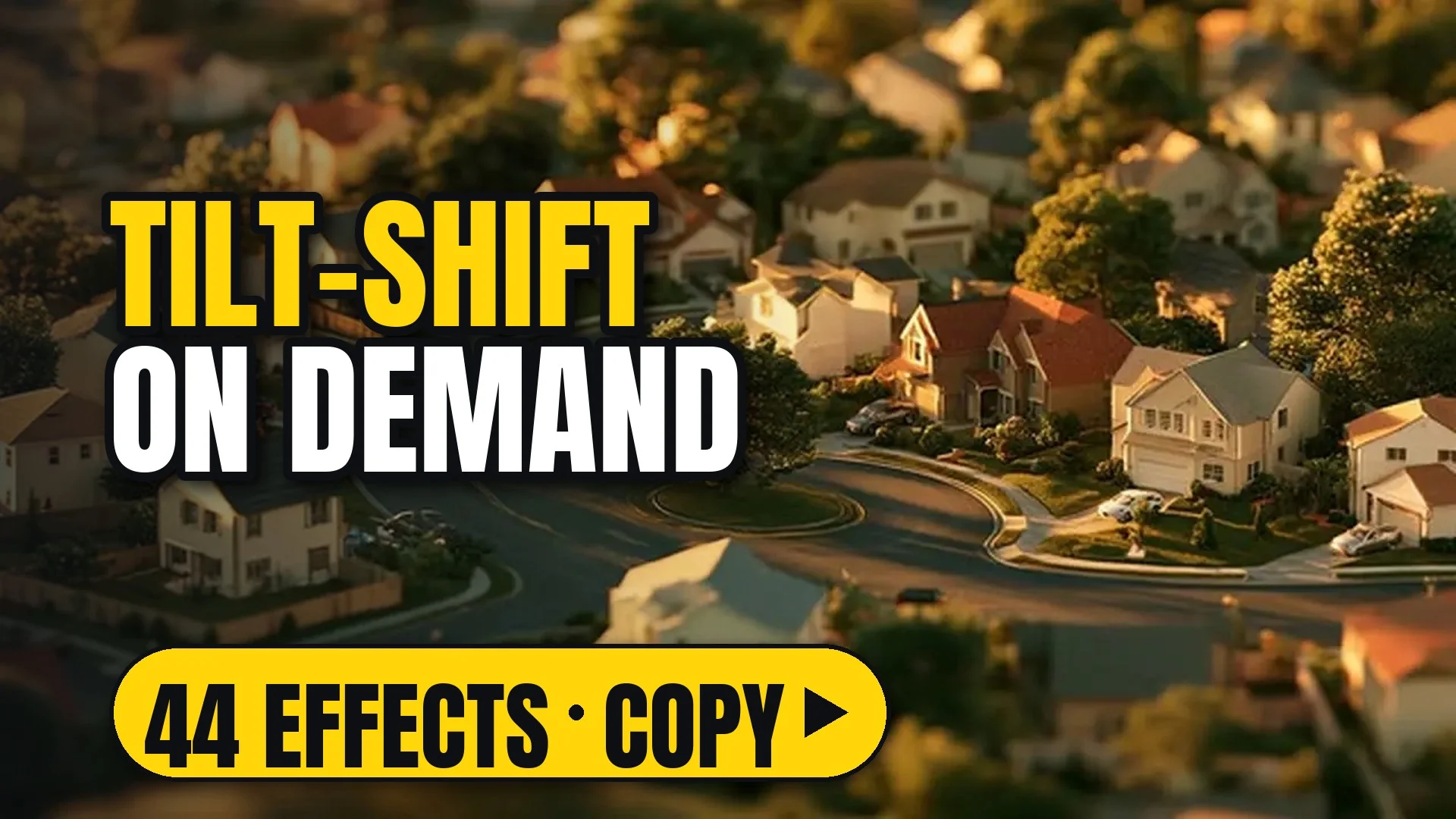
A tilt-shift view of a suburb that looks like a miniature model village

44 looks. Bokeh, flares, tilt-shift, glitches, particles and other in-camera effects.

How to use

Each look comes as a style prompt that starts with [your subject]. Replace it with what you are making (a perfume bottle on marble, a chef plating pasta, your character), keep the rest, and run it.

Make image or Make video opens ReelMe with the style prompt filled in. One camera move per clip; pair it with a shot size, not another move. Flares, grain and glitches come alive in motion: watch one play out in ReelMe Video (reelme.ai/video?mode=t2v).

44 prompts

Lens effects17

  • 14mm ultra-wide14mm ultra-wideImageVideo

    [your subject], 14mm ultra-wide: expansive field of view, strong near-to-far stretch, near objects larger than far ones, rectilinear lines with no circular border. Deep focus throughout and wide surroundings visible around the subject. NOT bowed, curving lines.

  • 24mm wide24mm wideImageVideo

    [your subject], 24mm wide: broad environmental framing, moderate wide-angle stretch, more surrounding space than a normal lens. Deep focus with a mild perspective lean toward the edges and the subject set within its space. NOT compressed depth.

  • 35mm moderate wide35mm moderate wideImageVideo

    [your subject], 35mm: classic storyteller focal length, natural perspective, slightly wider field than 50mm. The subject and nearby surroundings share the frame comfortably, without visible distortion or crowding. NOT exaggerated stretch.

  • 50mm normal50mm normalImageVideo

    [your subject], 50mm normal: human-eye perspective, neither compressed nor stretched. Proportions stay true, spacing between near and far planes looks natural, and focus falls off gently behind the subject. NOT wide-angle stretch.

  • 85mm portrait85mm portraitImageVideo

    [your subject], 85mm portrait: gentle background compression, smooth focus falloff, strong isolation from the background. Facial proportions look flattering and the surroundings dissolve into smooth soft color. NOT deep focus.

  • 135mm telephoto135mm telephotoImageVideo

    [your subject], 135mm telephoto: narrow field of view, stacked depth planes, strong compression. Distant elements appear large and close behind the subject, with a shallow, creamy plane of focus. NOT a wide view.

  • 200mm long telephoto200mm long telephotoImageVideo

    [your subject], 200mm long telephoto: extreme distance compression, isolated from far away. The subject looks observed from a distance, with flattened space, background planes stacked close behind it and shallow focus. NOT close-range perspective.

  • AnamorphicAnamorphicImageVideo

    [your subject], widescreen anamorphic: oval bokeh, restrained horizontal flare, natural proportions, coherent geometry, no baked-in letterbox bars. Slight edge falloff and a wide, horizontal feel to the frame. NOT round out-of-focus discs.

  • SphericalSphericalImageVideo

    [your subject], spherical prime: round bokeh, rectilinear edges, clean modern capture, no anamorphic streak. Even sharpness from centre to corners and neutral, faithful color and contrast rendering. NOT oval highlights.

  • FisheyeFisheyeImageVideo

    [your subject], frame-filling fisheye: extreme field of view, smooth barrel bend toward the edges, structurally coherent space, no circular black border. Lines curve strongly near the edges while the centre stays recognisable. NOT rectilinear lines.

  • Tilt-shiftTilt-shiftImageVideo

    [your subject], tilt-shift: narrow tilted plane of focus, blur increasing smoothly in front of and behind that plane, miniature-like sharpness, no arbitrary blur strips. The scene reads like a scale model. NOT uniform focus.

  • MacroMacroImageVideo

    [your subject], extreme macro: nearest plane razor-sharp, focus falling away rapidly, true close-up scale. Fine texture and tiny details fill the frame, everything beyond dissolving. NOT a normal working distance.

  • Probe lensProbe lensImageVideo

    [your subject], probe lens: tiny wide optic at impossible proximity, intimate wide-angle close-up, miniature-world perspective. The lens sits almost touching the subject, with deep focus and surroundings stretching away. NOT a distant view.

  • Split diopterSplit diopterImageVideo

    [your subject], split diopter: a near plane and a far plane both tack sharp, narrow soft transition between them, not uniformly sharp through the whole depth. One half of the frame holds a close element, the other a distant one. NOT a single focus plane.

  • Vintage cine glassVintage cine glassImageVideo

    [your subject], vintage cine glass: lower contrast, gentle halation, softly swirling edges, classic cinema-lens character, not clinical sharpness. Highlights glow and out-of-focus points render soft and warm. NOT clinical modern glass.

  • Telephoto compressionTelephoto compressionImageVideo

    [your subject], long-lens compression from far away: densely stacked background planes, motion toward camera appearing slower than it is, no wide-angle expansion. Distant elements loom large behind the subject. NOT wide-angle depth.

  • MagnificationMagnificationImageVideo

    [your subject], high optical magnification: scale lost on purpose, fine detail filling the frame. Surface texture and small features dominate with shallow focus and no wider context. NOT a context view.

Effects27

  • Film grainFilm grainImageVideo

    [your subject], film grain texture organic analog noise: fine, even grain over the whole frame, slightly stronger in the shadows and midtones, soft rather than sharp-edged, moving subtly from frame to frame. NOT digital noise blocks.

  • Heavy grainHeavy grainImageVideo

    [your subject], heavy film grain coarse texture high ISO noisy: large, clearly visible grain across every tone, clumping in the shadows, reducing fine detail and giving a rough, gritty surface. NOT a clean image.

  • Lens flareLens flareImageVideo

    [your subject], lens flare anamorphic light streaks: horizontal streaks and small colored ghosts spreading from bright points, mostly red and blue, crossing the frame without hiding the subject. NOT a flare-free image.

  • Heavy streak flaresHeavy streak flaresImageVideo

    [your subject], heavy streaking lens flare, bright light streaks from multiple sources: long blue-white horizontal lines running edge to edge from every strong light, layered and overlapping, with a starburst at the brightest point. NOT a single faint glint.

  • Chromatic aberrationChromatic aberrationImageVideo

    [your subject], chromatic aberration color fringing RGB split edges: red and cyan fringes along high-contrast edges, strongest toward the corners and only slight in the centre of the frame. NOT clean, fringe-free edges.

  • VignetteVignetteImageVideo

    [your subject], vignette darkened edges center focus: the corners and edges fall gently darker, the centre stays at full brightness, a smooth gradual transition. NOT evenly bright to the edges.

  • Heavy vignetteHeavy vignetteImageVideo

    [your subject], heavy vignette dark corners dramatic spotlight effect: the outer third of the frame falls almost to black, leaving a bright oval around the subject like a spotlight. NOT a subtle edge falloff.

  • BokehBokehImageVideo

    [your subject], beautiful bokeh creamy out of focus background shallow depth: points of light behind the subject melt into soft round discs, the plane of focus thin and the transition smooth. NOT a sharp backdrop.

  • Oval bokehOval bokehImageVideo

    [your subject], anamorphic oval bokeh elliptical out of focus lights: out-of-focus highlights stretch into vertical ovals, soft-edged and evenly lit, behind and in front of a sharp subject. NOT round discs.

  • Motion blurMotion blurImageVideo

    [your subject], motion blur movement speed dynamic: moving elements smear into soft horizontal streaks along their path while anything still in the frame stays crisp and sharp. NOT frozen, crisp motion.

  • Radial blurRadial blurImageVideo

    [your subject], radial blur zoom effect speed lines center focus: the edges stretch into streaks radiating from a sharp centre point, color lights pulled into lines. NOT a uniform blur.

  • Soft focusSoft focusImageVideo

    [your subject], soft focus dreamy glow diffused light: the whole image slightly softened, highlights spreading into a gentle glow and fine detail smoothed while shapes stay readable. NOT razor-sharp detail.

  • HalationHalationImageVideo

    [your subject], halation red glow highlights film bleeding light: bright points and edges carry a thin red-orange glow bleeding into the dark around them, strongest on small hard highlights. NOT clean highlight edges.

  • Light leakLight leakImageVideo

    [your subject], light leak orange red warm film exposure artifact: a soft wash of saturated orange-red entering from one edge, fading across part of the frame and lifting the blacks there. NOT a clean, even exposure.

  • Dust & scratchesDust & scratchesImageVideo

    [your subject], dust scratches vintage film damage aged worn: fine white specks and thin vertical scratches scattered over the image, faint and irregular, flickering frame to frame. NOT a pristine image.

  • VHS distortionVHS distortionImageVideo

    [your subject], VHS distortion tracking lines scan lines retro analog: horizontal scan lines, a wobbling color fringe along one edge, soft smeared detail and occasional tracking noise bars. NOT crisp digital.

  • GlitchGlitchImageVideo

    [your subject], glitch effect digital distortion RGB shift corrupt: thin horizontal bands displaced sideways, red and blue channels offset and brief blocky artifacts across parts of the frame. NOT a clean signal.

  • Double exposureDouble exposureImageVideo

    [your subject], double exposure overlay multiple exposure composite: a second translucent image blended over the subject's silhouette, both visible at once, darker areas showing more of the overlay. NOT a single exposure.

  • PrismPrismImageVideo

    [your subject], prism effect rainbow light refraction kaleidoscope: repeated, angled reflections of the scene around the edges, rainbow fringes along the splits and a clear centre. NOT a clean single image.

  • SmokeSmokeImageVideo

    [your subject], smoke effect wispy atmospheric particles volumetric: soft white wisps curling around and behind the subject, catching the light, thicker low in the frame and thinning above. NOT clear air.

  • Raindrops on lensRaindrops on lensImageVideo

    [your subject], rain drops on lens water droplets wet glass: round droplets clinging to the front of the lens, sharp at their edges and refracting light, with the scene softly visible through them. NOT a dry lens.

  • Frosted lensFrosted lensImageVideo

    [your subject], frosted lens ice crystals cold frozen edges: white feathered ice crystals spreading in from the edges of the frame, the centre clear and the overall tone cooled. NOT a clear lens.

  • Barrel distortionBarrel distortionImageVideo

    [your subject], barrel distortion fisheye curved edges wide angle: straight lines bow outward toward the edges, the centre bulging forward and the corners pinched inward. The distortion is strongest near the frame edges. NOT straight lines.

  • God raysGod raysImageVideo

    [your subject], god rays volumetric light beams crepuscular rays divine: bright, warm beams fanning down from above through haze, falling across the subject in visible shafts. NOT clear, beam-free air.

  • BloomBloomImageVideo

    [your subject], bloom effect bright glow soft highlights dreamy: every bright area spreads a soft glow into its surroundings, lights flaring into halos and the overall contrast slightly lowered. NOT crisp highlight edges.

  • Mist filterMist filterImageVideo

    [your subject], diffusion mist filter softened highlights haloed glow film: highlights carry a light halo, contrast is softened and lifted, and the whole frame takes on a gentle filmic haze. NOT harsh digital contrast.

  • Black mist filterBlack mist filterImageVideo

    [your subject], black diffusion mist subtle glow lowered contrast cinematic: a faint glow around highlights, slightly reduced contrast and smoothed fine detail while the blacks stay deep. NOT milky lifted blacks.

Make it in ReelMe

Want to compare lenses? Render a 24mm and an 85mm version of the same prompt in ReelMe Image. A still shows focal length and bokeh at a glance.

Nov 12, 2026

How it works

3 steps

  1. Pick a look

    Choose one of the 44 lens effects and copy its prompt.

  2. Add your subject

    Replace [your subject] with what you are making; keep the rest.

  3. Run it in ReelMe

    Paste it into ReelMe Video at reelme.ai/video?mode=t2v and generate.

  • Camera · Prompt library · from the ReelMe composer

    73 looks with previews: copy a style prompt, add your subject, run it in ReelMe.

    1. Pick a look: Choose one of the 73 camera and lens looks and copy its prompt.
    2. Add your subject: Replace [your subject] with what you are making; keep the rest.
    3. Run it in ReelMe: Paste it into ReelMe Image at reelme.ai/image?aspect=16:9 and generate.
  • Framing

    Prompt library

    Camera · Prompt library · from the ReelMe composer

    60 looks with previews: copy a style prompt, add your subject, run it in ReelMe.

    1. Pick a look: Choose one of the 60 framings and copy its prompt.
    2. Add your subject: Replace [your subject] or [your subjects] with what you are making.
    3. Run it in ReelMe: Paste it into ReelMe Image at reelme.ai/image?aspect=16:9 and generate.
  • Camera · Prompt library · from the ReelMe composer

    19 looks with previews: copy a style prompt, add your subject, run it in ReelMe.

    1. Pick a look: Choose one of the 19 shot sizes and angles and copy its prompt.
    2. Add your subject: Replace [your subject] or [your subjects] with what you are making.
    3. Run it in ReelMe: Paste it into ReelMe Image at reelme.ai/image?aspect=16:9 and generate.

Want it step by step? From Zero to AI Creator